もくじ
https://tera1707.com/entry/2022/02/06/144447
やりたいこと
WinUIで、ItemsRepeater を使ってデータの保存用クラスに格納したデータを表示するときにDataTemplateを使うのだが、DataTemplateの中では、ItemsRepeaterのItemsSourceに指定したデータが持っているプロパティにしかBinding(x:Bind)できなかった。
これを、ViewModelとかの、データ用クラスの外側のプロパティにBindしたい。
前提
以下の環境で実験した。
- VisualStudio 2022 17.14.20
- .NET6.0
- Microsoft.WindowsAppSDK:1.4.230913002
今回のやりかた
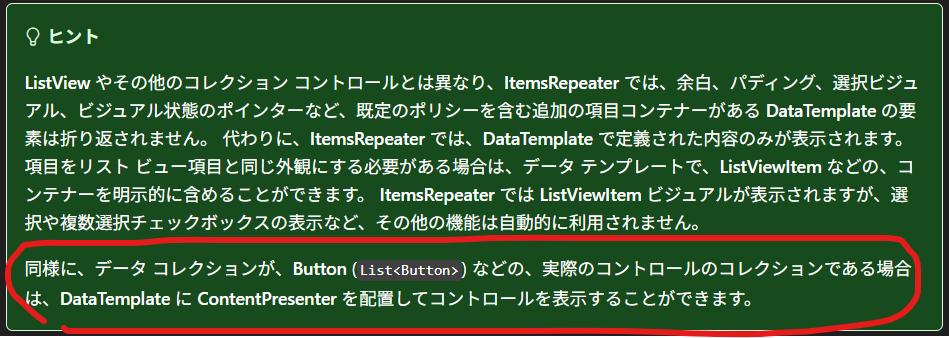
データ用クラスの外側のプロパティにBindしたいControlを、DataTemplateの中に書かずに、ContentPresenterで受けるようにして、
コードからそのControlをデータ用のクラスのメンバとして差し込んでやるようにした。
差し込むControlは、C#コード上でデータ用クラスの外側のプロパティにBindingするように設定しておく。
作成したコード
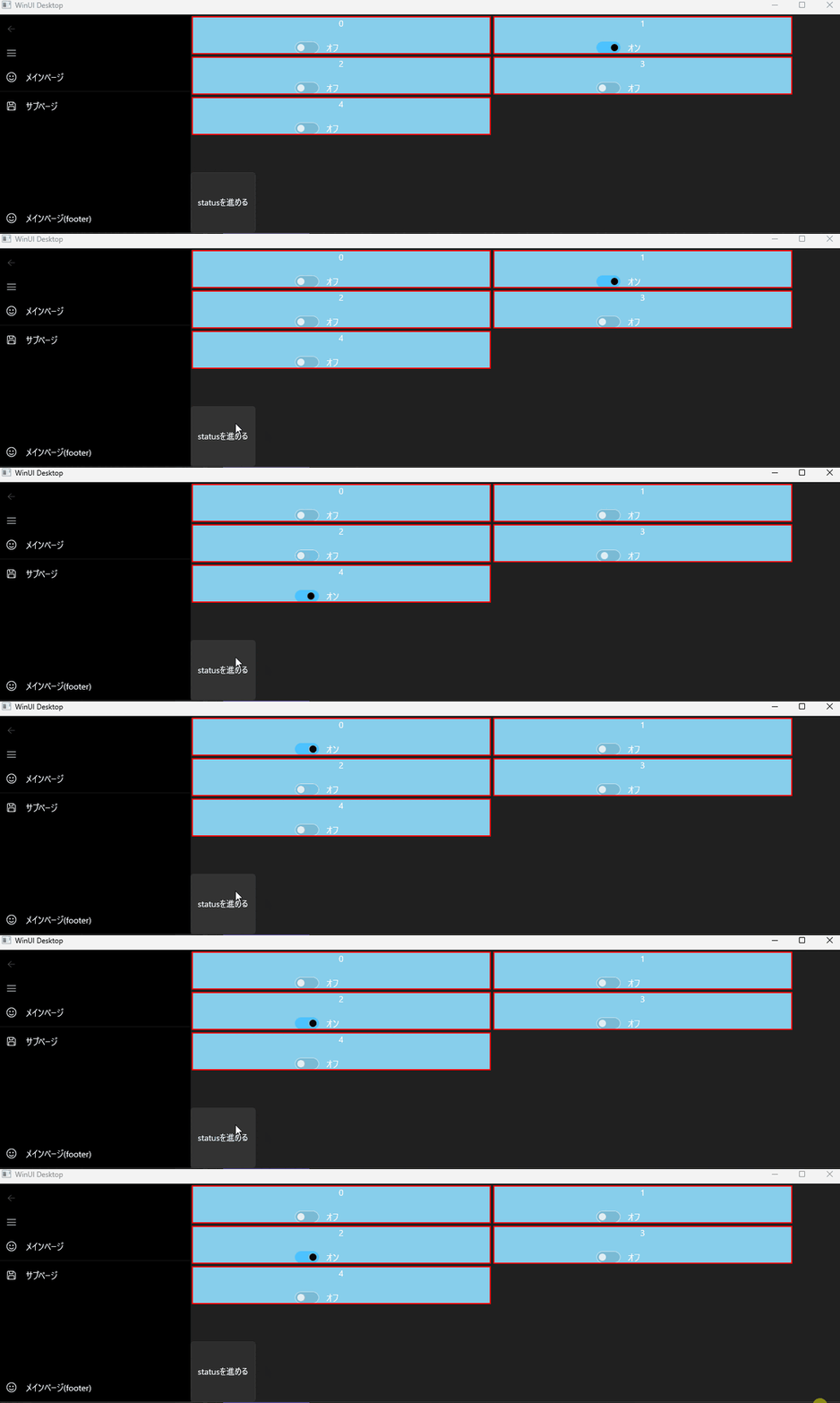
動かすとこうなる
(データ用クラスの外側のプロパティ(status)を++していくと、その値にBindingしたToggleSwitchのIsOnプロパティがONOFFする。)
このやり方について
このやり方は、ItemsRepeaterについてのMS公式の👇の部分をみて思いついた。
ItemsRepeaterは、中身のデータをC#コード側から作るので、C#側でBindingすることについてもあまり違和感はないかも。 (xamlだけではもともと完結しないから、という意味で。)
コード内容
画面部分
<?xml version="1.0" encoding="utf-8"?>
<Page
    x:Class="MyWinUI3PackageProjectTemplate6.View.MainPage"
    xmlns="http://schemas.microsoft.com/winfx/2006/xaml/presentation"
    xmlns:x="http://schemas.microsoft.com/winfx/2006/xaml"
    xmlns:local="using:MyWinUI3PackageProjectTemplate6.View"
    xmlns:d="http://schemas.microsoft.com/expression/blend/2008"
    xmlns:mc="http://schemas.openxmlformats.org/markup-compatibility/2006"
    mc:Ignorable="d"
    Background="{ThemeResource ApplicationPageBackgroundThemeBrush}">

    <Grid>
        <ItemsRepeater ItemsSource="{x:Bind MyDatas}">
            <ItemsRepeater.Layout>
                <UniformGridLayout MaximumRowsOrColumns="2" MinItemWidth="500"/>
            </ItemsRepeater.Layout>

            <DataTemplate x:DataType="local:MyData">
                <Border BorderBrush="Red" BorderThickness="2" Margin="2" >
                    <Grid HorizontalAlignment="Stretch" Background="SkyBlue">
                        <Grid.RowDefinitions>
                            <RowDefinition />
                            <RowDefinition />
                        </Grid.RowDefinitions>

                        <TextBlock Grid.Row="0" Text="{x:Bind Data1}" HorizontalAlignment="Center"/>
                        <ContentPresenter Grid.Row="1" Content="{x:Bind Toggle}" HorizontalAlignment="Center"/>
                    </Grid>
                </Border>
            </DataTemplate>
        </ItemsRepeater>

        <Button Content="statusを進める" Click="Button_Click" VerticalAlignment="Bottom" Height="100" />
    </Grid>

</Page>
C#部分
using Microsoft.UI.Xaml;
using Microsoft.UI.Xaml.Controls;
using Microsoft.UI.Xaml.Data;
using MyWinUI3PackageProjectTemplate6.Converters;
using System.Collections.ObjectModel;
using System.ComponentModel;

namespace MyWinUI3PackageProjectTemplate6.View;

// データ用のクラス
public record MyData(int Data1, ToggleSwitch Toggle);

// ページのクラス
public sealed partial class MainPage : Page, INotifyPropertyChanged
{
    // この数字(MyStatus)とToggleSwitchごとに割り当てられた数字が一致したら、ToggleSwitchをONにする
    public int MyStatus { get; set; } = 0;
    // ItemsRepeaterに表示するためのデータ
    public ObservableCollection<MyData> MyDatas = new ObservableCollection<MyData>();

    public MainPage()
    {
        this.InitializeComponent();

        // データをいくつか作成
        MyDatas.Add(new MyData(0, CreateMyToggleSwitch(this, nameof(MyStatus), 0)));
        MyDatas.Add(new MyData(1, CreateMyToggleSwitch(this, nameof(MyStatus), 1)));
        MyDatas.Add(new MyData(2, CreateMyToggleSwitch(this, nameof(MyStatus), 2)));
        MyDatas.Add(new MyData(3, CreateMyToggleSwitch(this, nameof(MyStatus), 3)));
        MyDatas.Add(new MyData(4, CreateMyToggleSwitch(this, nameof(MyStatus), 4)));
    }

    // バインディングの設定が出来たToggleSwitchを作成するためのメソッド
    private static ToggleSwitch CreateMyToggleSwitch(object src, string PropertyName, int targetStatus)
    {
        var ts = new ToggleSwitch();
        Binding myBinding1 = new Binding();
        myBinding1.Path = new PropertyPath(nameof(MyStatus));
        myBinding1.Source = src;
        myBinding1.Mode = BindingMode.OneWay;
        myBinding1.Converter = new InvertBooleanConverter();
        myBinding1.ConverterParameter = targetStatus;
        ts.SetBinding(ToggleSwitch.IsOnProperty, myBinding1);
        return ts;
    }

    private void Button_Click(object sender, RoutedEventArgs e)
    {
        MyStatus = MyStatus < MyDatas.Count - 1 ? MyStatus + 1 : 0;//最大数を超えたら0に戻す
        OnPropertyChanged(nameof(MyStatus));
    }

    // IPropertyChangedお決まり部分
    public event PropertyChangedEventHandler PropertyChanged;
    public void OnPropertyChanged(string propertyName)
    {
        if (this.PropertyChanged != null)
            this.PropertyChanged(this, new PropertyChangedEventArgs(propertyName));
    }
}
参考
MS公式 ItemsRepeater
https://learn.microsoft.com/ja-jp/windows/apps/develop/ui/controls/items-repeater
